


Before AI Artwork Reaches the RIP: A Three-Gate Intake Check


A file built with generative AI can look complete on a screen and still be missing what the job actually needs. Before artwork that includes AI-generated or AI-assisted content reaches the RIP, it should clear three separate checks: where the source assets came from, whether the content has actually been approved, and whether the file meets production requirements. A pass on one check says nothing about the other two.
Why AI-Generated Artwork Looks Finished But Fails at the RIP
Files built partly or entirely with AI tools are starting to arrive at intake looking finished, without the usual tells that flag a rushed submission. Missing fonts and obvious low-resolution placeholders used to be a quick signal that a file needed a second look. AI-generated artwork often doesn’t have those tells, yet it still has issues.
The gap is not a defect in the software. A generative AI tool produces an image, a layout, or a block of copy based on a prompt. It has no way of knowing whether that output matches an approved brand asset, whether anyone signed off on the words it wrote, or whether the file will actually run on a given press and stock. A finished look on screen answers none of those questions.
Performing these three checks can help determine whether AI-generated or AI-assisted content is ready for RIPping.
Gate 1: Is the Source and Provenance of the Artwork Reliable?
A logo, product shot, or brand mark generated or re-created by an AI tool is not the same as the approved brand asset, even when it looks close. Trademarks, packaging structures, and regulated symbols re-created this way can drift from the exact approved version in ways a glance will not catch: a shifted color, a slightly different proportion, an icon redrawn just enough to be wrong.
Resolution is a second problem. Many AI-generated image assets arrive as raster files, and a sharp screen preview does not guarantee sufficient effective resolution at final production size or a clean scale to the finished dimension.
The recurring pattern worth naming from experience: A logo re-created with AI lands close enough to pass a quick glance but is wrong enough to fail next to the approved master. The gate question is simple: Can the submitter point to where each key asset actually came from, and is that the version currently approved?
Gate 2: Has the Content Actually Been Approved?
AI-assisted copy and layout tools can alter wording, restructure claims, or introduce information that was never checked against a source document. In packaging and label work, that reach extends to regulatory and compliance text: ingredient lists, warnings, care instructions. One AI-introduced edit can change the meaning of a line a brand or a regulator expects to read exactly one way.
The same gap applies to barcode data. A barcode graphic added or adjusted by an AI layout tool can look correct and decode to nothing, because nothing about how a barcode looks confirms what it decodes to or whether it was built from real data in the first place.
The gate question here is about a person, not a file. Has a named individual actually reviewed the specific content in front of them, or did they approve an earlier version that an AI tool later touched?
Gate 3: Does the File Actually Meet Production Requirements?
AI-generated assets commonly arrive as RGB raster content and may have no awareness of the dieline, bleed, or finishing requirements that govern the actual job. Transparency, fonts, and structural marks behave the same way they would in any other file once it reaches the RIP. An AI origin does not exempt a file from the standard checks; it just changes where the errors tend to cluster.
The gate question here remains the one asked of any file: Does this specific piece, at this specific size, meet the specs the job ticket requires, checked the same way any submission would be?
Automated preflight already handles Gate 3 well. It reads color mode, resolution, bleed, and structural marks against a fixed rule set, and it does that quickly and consistently. What it cannot do is answer Gate 1 or Gate 2, because provenance and approval are not properties of the file itself. A clean preflight report says a file is well formed. It says nothing about where the artwork came from or who signed off on it.
The Three-Gate Intake Checklist
A short checklist, run once per file, keeps the three gates from becoming three separate arguments every time a job comes in.
- Source and provenance: asset origin identified, brand assets confirmed against approved masters, resolution and vector status confirmed, rights or licensing status noted.
- Content approval: copy checked against the approved source, regulatory or compliance text checked against the approved source, barcode data verified against real values, named approver on file.
- Production readiness: color mode, resolution, bleed and dieline, fonts, and transparency plus finishing marks, all matched to the shop's actual workflow rather than a generic list.
What Happens When a File Fails a Gate?
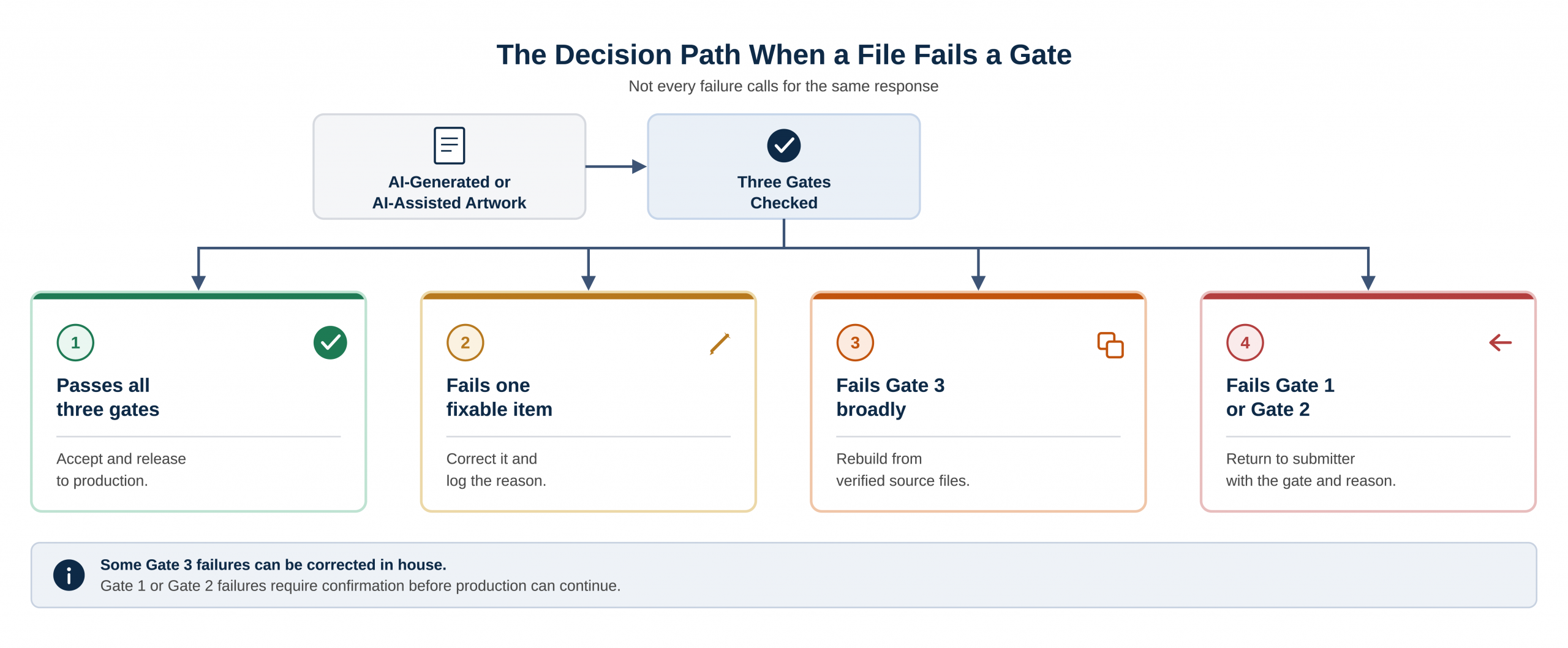
Not every failure calls for the same response. Four outcomes cover most of what actually happens at intake.
- Passes all three gates: accept and release to production.
- Fails one fixable item, such as color mode or resolution: correct it and log the reason.
- Fails Gate 3 broadly, because the underlying assets were never right: rebuild from verified source files rather than patching the AI output.
- Fails Gate 1 or Gate 2, because no one can confirm the source or the approval: return the file to the submitter and indicate the specific gate at which there was a failure and why.
Click to enlarge. | Credit: Kevin Bharmal
Where to Start
The next AI-flagged file that reaches intake is the place to start. Run the three gates before it moves any further, and treat a finished-looking file the same as any other unverified submission until each gate has actually been checked. The check takes minutes. Correcting a failure after the file has already reached production rarely does.
The preceding content was provided by a contributor unaffiliated with Printing Impressions. The views expressed within may not directly reflect the thoughts or opinions of the staff of Printing Impressions. Artificial Intelligence may have been used in part to create or edit this content.
Kevin Bharmal is founder and prepress director at Alpha Prepress, where his team has prepared files for label converters, packaging printers, and commercial shops since 2006.
 The Week that Was (8/31/26)
 Preserving Institutional Knowledge | Part 2: How to Capture It Before It Walks Out the Door
 Agentic AI’s Dirty Secret
 Education on AI: From Concept to Implementation
 Findings from AI Study in the US and Italy
Preserving Institutional Knowledge | Part 1: What Print Businesses Are Losing
Findings from AI Study in the US and Italy
Preserving Institutional Knowledge | Part 1: What Print Businesses Are Losing
